
To support seamless program engagement, users can now join sessions instantly without completing the entire registration process. This feature prioritizes convenience while ensuring essential registration protocols are maintained.
Key Points:
- Join Session Pop-Up
If a session has not yet started: The Join Session pop-up will appear at the top left of the Professional Details page during the sign-up process. It will be visible 5 minutes before the session begins and remain accessible for 30 minutes after the scheduled start time.
Users are required to fill in their personal details before proceeding.
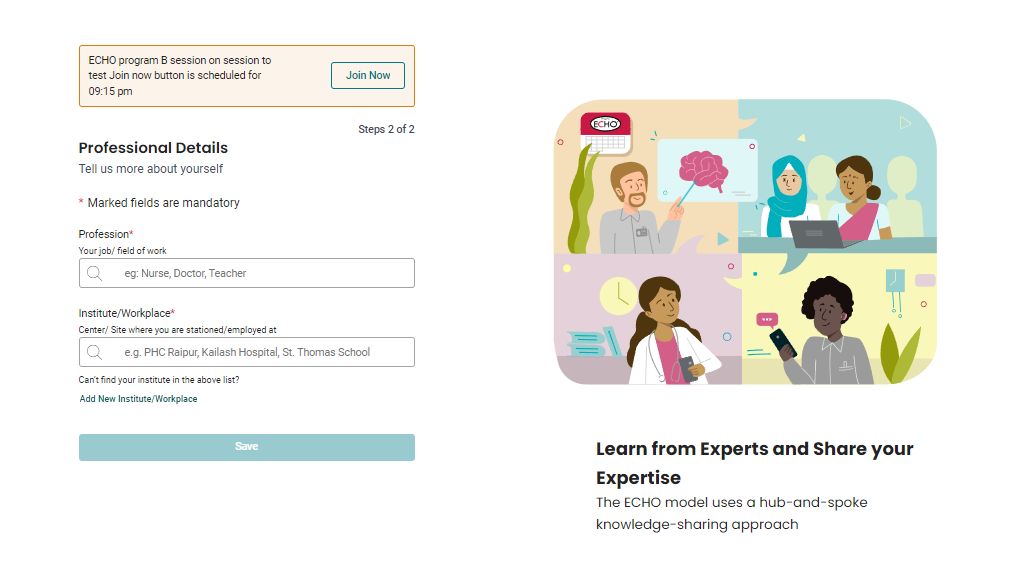
If a session has started:
The Join Session pop-up will display session details at the top left of the Professional Details page for immediate access.
- Applicability:
This feature applies to:
- New users who are invited to a program.
- Users accessing iecho.org via an invitation link or directly.
- Session Details:
The latest session that is about to start or is already in progress will be displayed.
Note: Profile completion is mandatory. Users can join up to three consecutive sessions without completing their profile. After each session, they will receive a prompt to complete their profile to ensure continued access to future sessions.