
If you find any data discrepancies, please reach out to support@iecho.org
Explore your engagement and learning journey across iECHO programs and participant groups. This dashboard provides insights into your participation, attendance, and activities across all programs in which you are enrolled as a participant.
To access your dashboard:
- Log in to iECHO.
- Click Participant View (only available if you are registered in a program as a participant).
- On the home page, click the Analytics icon.
At the top of the dashboard, summary cards show your key stats across your ECHO journey.
| Metric | Calculation |
|---|---|
| Attendance Rate | Attendance Rate % = (Total Attended Sessions / Total Sessions) * 100 This metric represents your ovrall attendance across all programs and participant groups in which you are enrolled. |
| Certificates Earned | Total certificates awarded to you across all programs. |
| Completed Programs | Programs you enrolled in that have concluded, with no further sessions scheduled. |
| Cases Presented | Total number of cases you presented across all programs. |
| Ongoing Programs | Total number of active programs in which you are currently enrolled. |
| Feedback Submitted | Total number of post-session feedback surveys submitted across sessions you attended. |
| Assessments Completed | Total number of pre- and post-assessments you have submitted. |

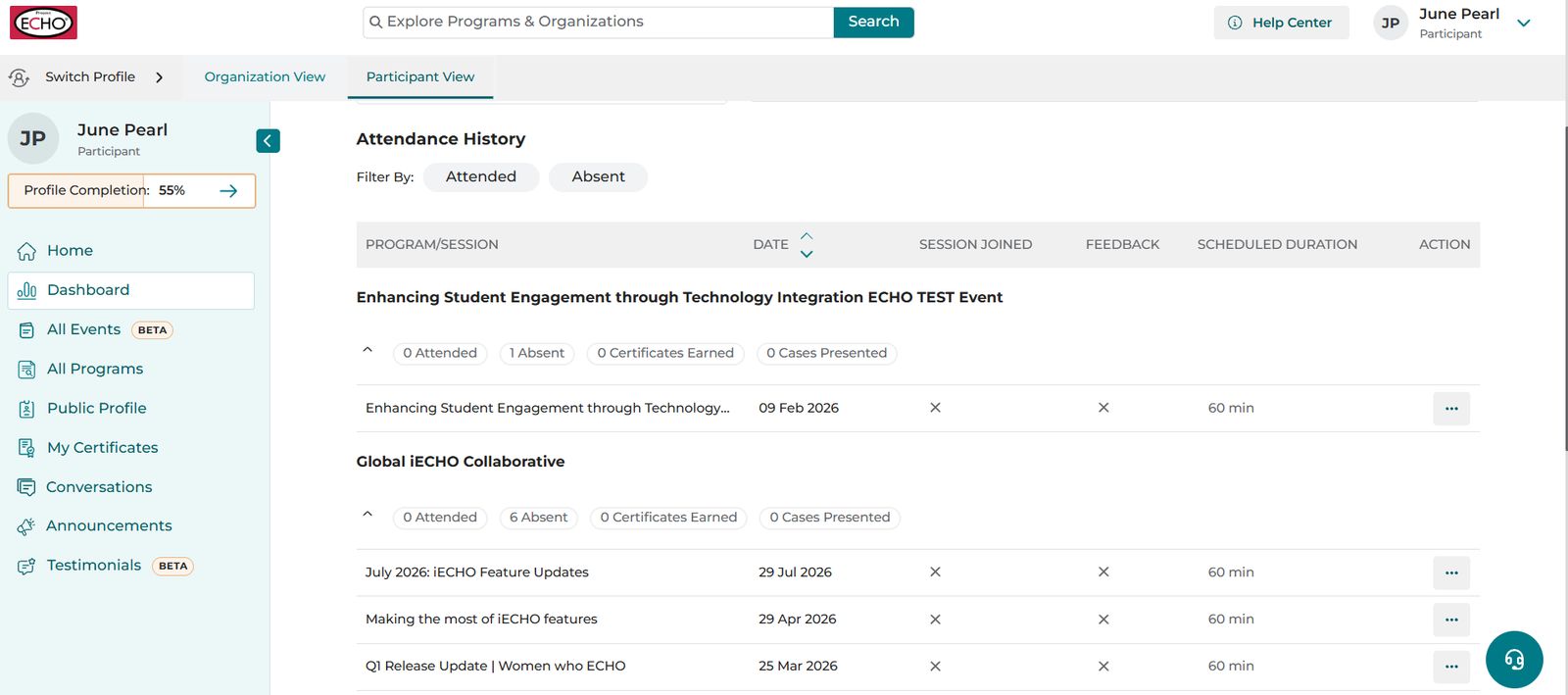
Attendance History
Under Attendance History, you can view a record of all sessions across the programs in which you are enrolled. Use the Attended and Absent tabs to filter sessions by attendance.
Each program appears as a group. Click the down arrow next to any program name to open it and view session details.
| Metric | Description |
|---|---|
| Session Joined | Indicates whether you joined the session. |
| Feedback | Shows whether you submitted the feedback form for the session. Click the three-dot menu to submit feedback for a session. |
| Scheduled Duration | The total scheduled duration of the session. |
| Action (Desktop only) | Submit feedback for the session directly from this column. |
Note: Only sessions conducted after you were invited to the program are included in your Attended and Absent session counts.