

This CSV file includes detailed attendance data for each organization, covering participation metrics from all programs and participant groups. It provides an overview of attendance patterns and engagement levels, making it easy to identify trends and insights across different programs and participant groups.
If a session was recently conducted, we recommend downloading the data export 24 hours after the session end time to allow for proper reconciliation.
Owners can instantly download data for all programs via the Organization Data Export.
Program Admins can access reports only for programs where they have edit permissions.
Here is how you can access this report:
- Navigate to your iECHO Homepage.
- Open the left panel and select the Analytics icon to view analytics.
- Alternatively, click View More Analytics in the Your Journey section at the top of the screen.
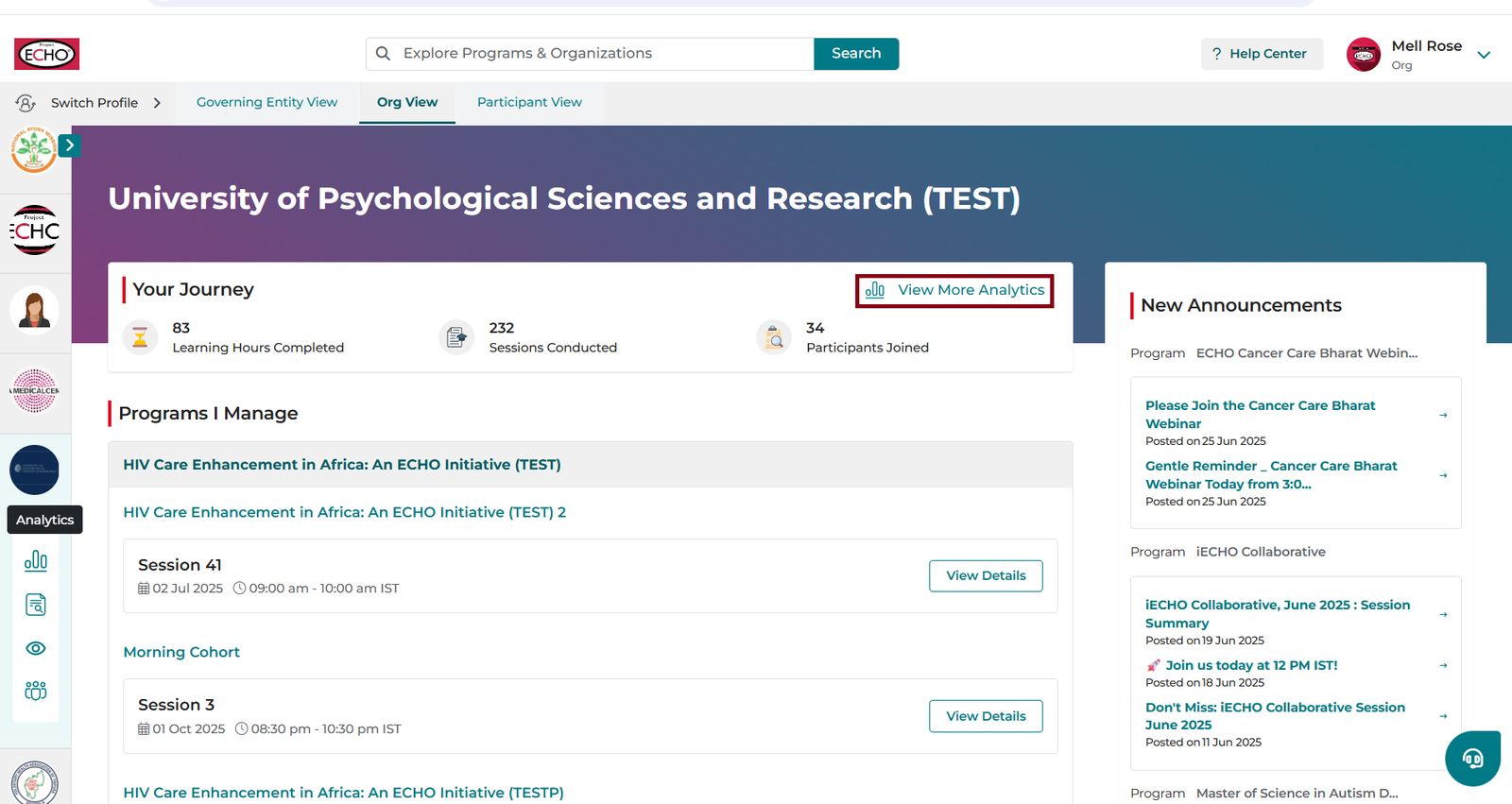
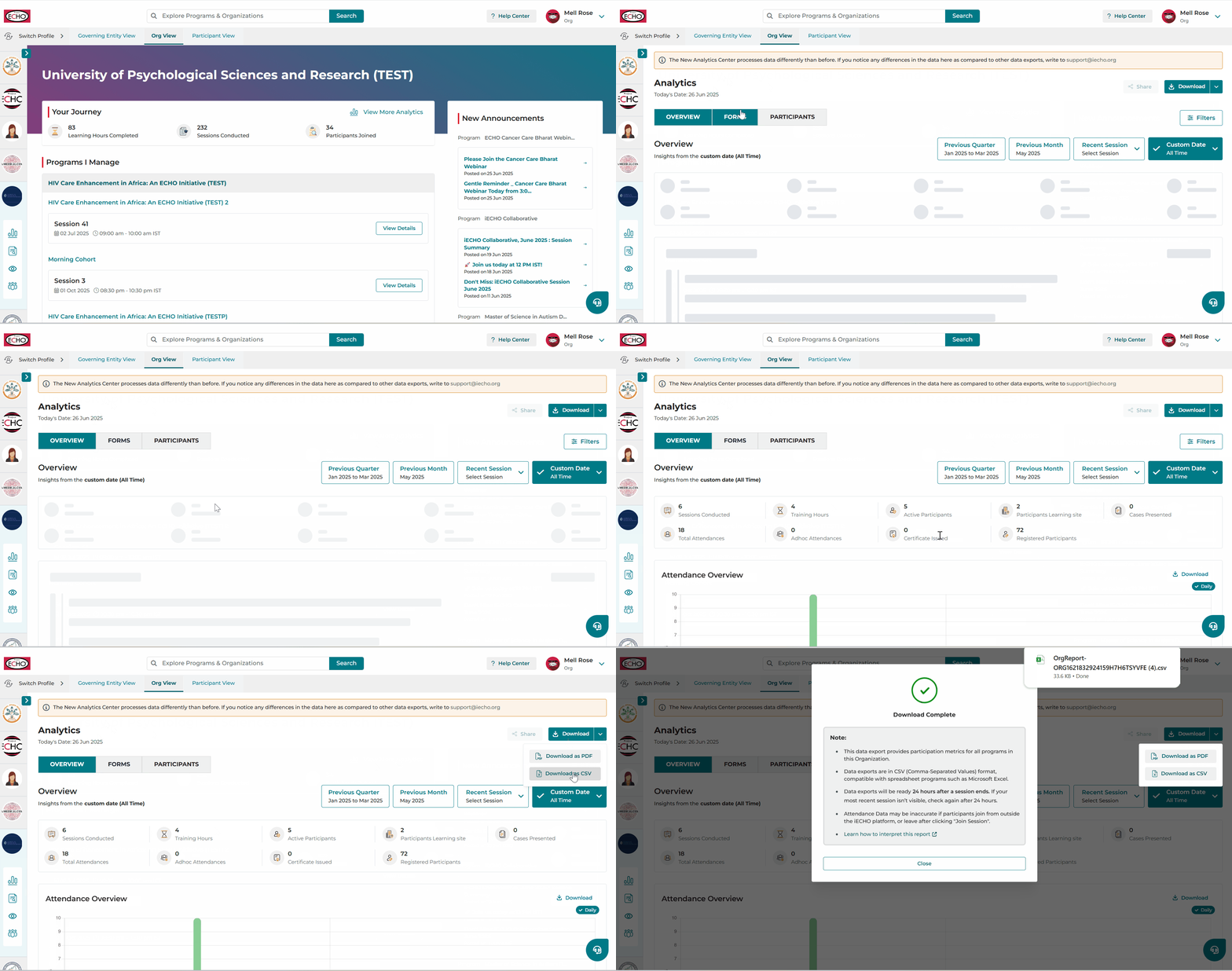
- On the Analytics page, click Download in the top right to export the All Programs Data Export.
Check this tutorial on how to download this report:
Understanding Reports
The roles defined in the data export include:
| Role | Definition |
|---|---|
| Attendee | Participant registered on iECHO with an Active user activity status. |
| Invited | Participant invited to join a participant group in a program but who did not register. |
| Program Admin | Organization team members and ECHO team members registered in the Organization. |
| Subject Matter Expert (SME) | An expert invited for a session to present on a topic. |
Details of the metrics used in the data export:
| Fields | Description |
| Organization Name | Name of the organization that conducts ECHO programs. |
| Total Sessions Conducted | Total sessions conducted across all programs by the organization. |
| Launch Date (First Session Conducted Date) | Date of the first session conducted in any program within any participant group. |
| Number of Participants | All unique users (irrespective of status - Active or Invited) for any program, participant group, or session in that organization. This includes every role (Organization Team, Attendee, SME). |
| First Name | First name of the person registered for one or more programs conducted by the organization. |
| Last Name | Last name of the person registered for one or more programs conducted by the organization. |
| Status | iECHO activity status in the organization (Active or Invited). Active: Registered on the iECHO platform. Invited: Invited to the iECHO platform. |
| Title | Job title or designation of the person who is part of the organization. |
| Academic Qualifications | Formal certifications or degrees obtained through educational institutions by the person, if added. |
| Areas of Expertise | A specialized field or subject in which the person possesses advanced knowledge, skills, and experience. |
| Email address of the person. | |
| Country Code | A numerical prefix used to specify the country associated with a phone number when making international calls (e.g., +91 for Indian phone numbers). |
| Phone Number | Phone number of the person. |
| Roles | Role assigned to the person (e.g., Organization Admin, Attendee). Read more about Organization Roles. |
| Facility/Institute | Place of work or learning for a person. |
| Facility City/Town | City or town where the facility/institute is located. |
| Facility District/County | District or county where the facility/institute is located. |
| Facility State/Province | State or province where the facility/institute is located. |
| Facility Country | Country where the facility/institute is located. |
| Profession | Occupation requiring specialized training, expertise, and adherence to ethical standards (e.g., Nurse, Physician). |
| City / Town | City or town where the person resides. |
| District / County | District or county where the person resides. |
| State / Province | State or province where the person resides. |
| Country | Country where the person resides. |
| Gender | Gender specified by the person. |
| Time Zone | Standardized time zone for the user region (e.g., India Standard Time (IST), UTC+05:30). |
| Primary Speaking Language | Chosen language in which the platform communicates with the person. |
| Participant Enrollment Date | Date on which the person registered for the program within a participant group. |
| Program A (No. of sessions joined) | Number of sessions joined in Program A by the person. |
| Program B (No. of sessions joined) | Number of sessions joined in Program B by the person. |
| Program C (No. of sessions joined) | Number of sessions joined in Program C by the person. |
| Cases Presented | Total number of cases presented by the person across all programs and sessions. |
| Lectures Presented | Total number of lectures presented by the person across all programs and sessions. |
Note: Program columns (such as Program A, B, or C) correspond to actual program names in your organization.
- N/A indicates the person is not part of the program, while 0 indicates the person is enrolled but has not attended any sessions.
- Attendance data may be inaccurate if participants join from outside the iECHO platform or leave immediately after clicking Join Session.
- Downloaded reports are provided in CSV (Comma Separated Value) format, which can be opened in spreadsheet software like Microsoft Excel.
- If a participant is unregistered and their status is Invited, session activity data will not be generated.
Troubleshooting All Programs Data Export
Case 1: If an organization exists but no programs have been created, you can still download the report.
Case 2: When programs exist but no participant groups have been created, session counts will display as N/A.
Case 3: When programs and participant groups exist but no sessions have been conducted, users not enrolled will show N/A and enrolled users will show 0.
Case 4: When sessions have been conducted, all fields will populate with attendance metrics.