
iECHO provides robust video conferencing support to enhance your virtual sessions, offering seamless integration options tailored to your needs. By default, iECHO supports Zoom as its built-in video conferencing solution. For users requiring specific functionalities or custom setups, iECHO also supports custom video conferencing integrations. However, we recommend using the built-in Zoom integration for the most effective and streamlined experience.
You can use custom video conferencing on iECHO when organizational policies or regional restrictions limit standard platforms, or when network conditions require more adaptable options. It also suits sessions with specific user preferences or unique requirements, providing flexibility for seamless communication.
The Manage Zoom Polls feature is currently not available for custom video conferencing integrations in iECHO. If your session links are integrated with a custom platform, you cannot edit polls directly through iECHO at this time.
To modify an existing poll, log in directly to the platform integrated with your session, such as Zoom, Microsoft Teams, or another supported platform.
Here is how you can add a custom video conferencing link:
- From your iECHO homepage, open the left navigation panel and select All Programs.
- Select the program where you want to add a custom video conferencing link.
- Select the participant group you want to configure.
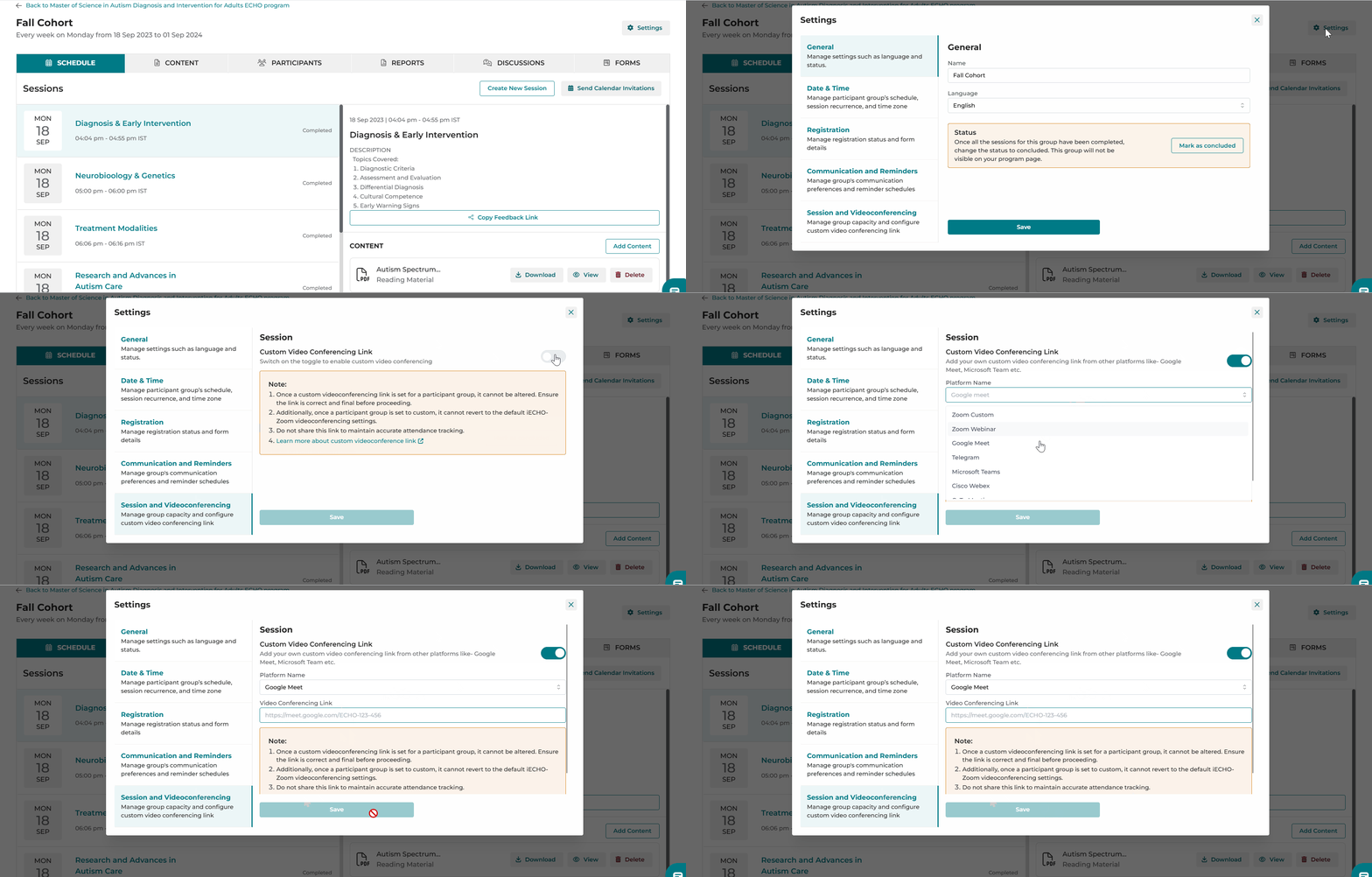
- Click Settings in the top right corner.
- Select Session and Videoconferencing at the bottom of the list.
- Turn on the toggle to enable custom video conferencing.
- Select the platform from the Platform Name menu:
- Zoom Custom
- Zoom Webinar
- Google Meet
- Telegram
- Microsoft Teams
- Cisco Webex
- GoTo Meeting
- Enter the URL in the Video Conferencing Link field.
Important: Once a custom video conferencing link is set for a participant group, it cannot be altered. Ensure the link is correct and final before proceeding.
- Additionally, once a participant group is set to custom, it cannot revert to the default iECHO Zoom video conferencing settings.
- Do not share this link directly in order to maintain accurate attendance tracking. If you use a custom video conferencing link from platforms like Google Meet or Microsoft Teams, participants can join the session by logging into the iECHO platform with their registered credentials.
Read below for important considerations when setting up a custom video conferencing integration:
- Troubleshooting: The iECHO team cannot assist with technical issues during custom sessions. Please address any problems directly with your video conferencing provider.
- Attendance Tracking: Session attendance reports will not record the duration of participant attendance.
- Attendance Accuracy for External Joiners: If participants join from outside the platform (such as without using the Join Session button in iECHO or the link in session reminder emails), iECHO may not accurately capture attendance. Avoid sharing direct video conferencing links.
- Security: Verify that your video conferencing system has adequate security measures, as iECHO cannot address security issues on third-party systems.
- User Access: Confirm that all participants have the required permissions to join the session on your chosen platform.
- Session Start: iECHO cannot start sessions automatically for custom platforms. Ensure the session is initiated through your chosen platform.
- Testing: Test the video conferencing link and functionality prior to the session.
- System Downtime: iECHO is not liable if a third-party video conferencing system experiences downtime.