

Recommended timing
If a session has been recently conducted, download the report 24 hours after the session's end time to allow for proper reconciliation. Downloading too early may show an "error in fetching report" in the duration column.
Two export types, at a glance
iECHO offers two related but structurally different participant reports. Pick based on the question you're answering.
- Session-level export
One row per participant, for one session. Use this to understand what happened in a specific session - who joined, from where, and session-specific attendance metrics.
- Group-level export (All Data)
One row per participant, across all sessions in the group. Use this to understand a participant's full history in a group - total sessions attended/absent, and a Present/Absent column per session.
How to access these exports?
- From your iECHO Homepage, open the left panel and select the second icon to view
All Programs. - Select the Program and Participant Group for which you want the data.
- Go to
Reports. - From the Session's dropdown:
- For a single session, choose that specific session from the list.
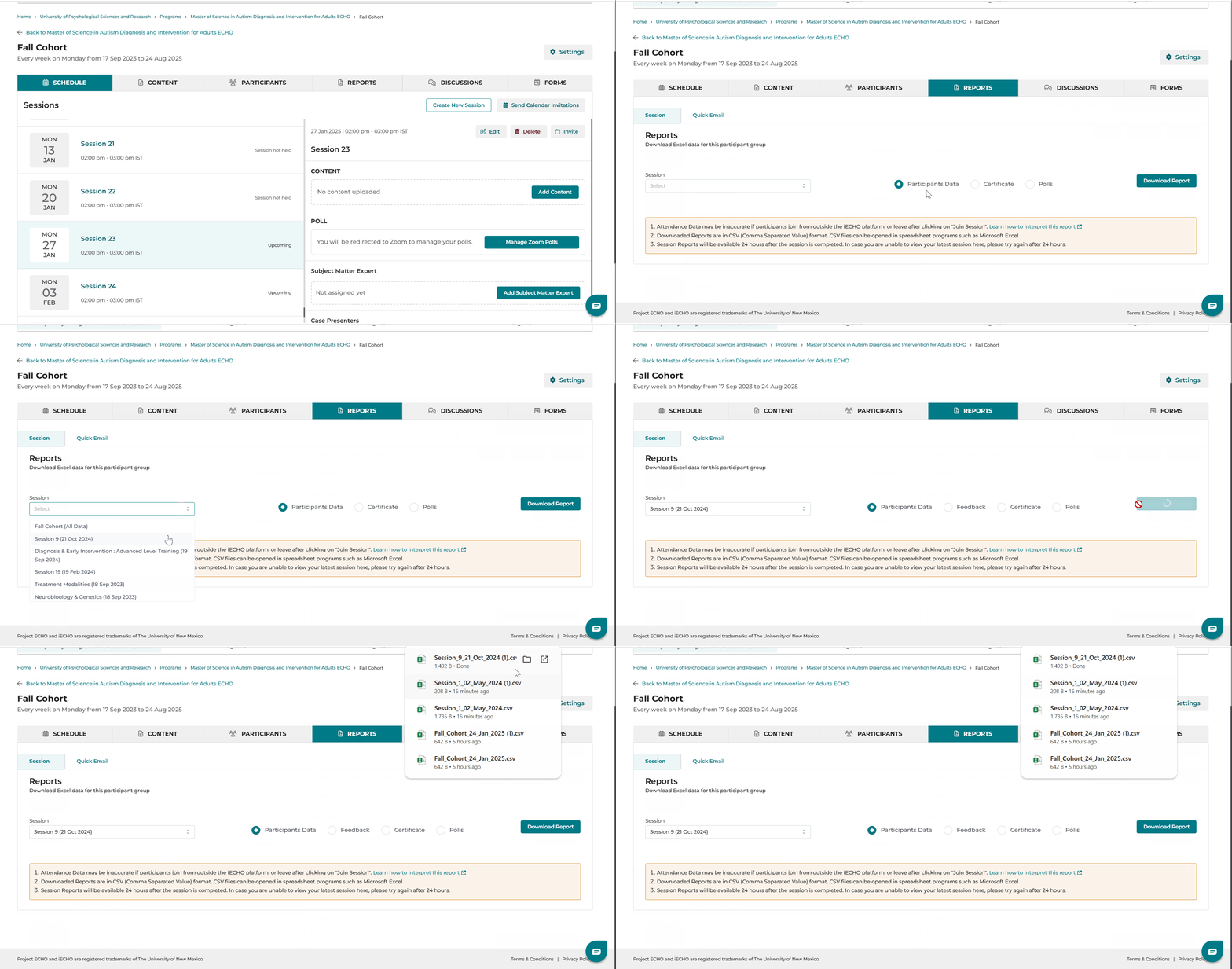
- For all sessions in the group, choose the first option — Participant Group Name (All Data).
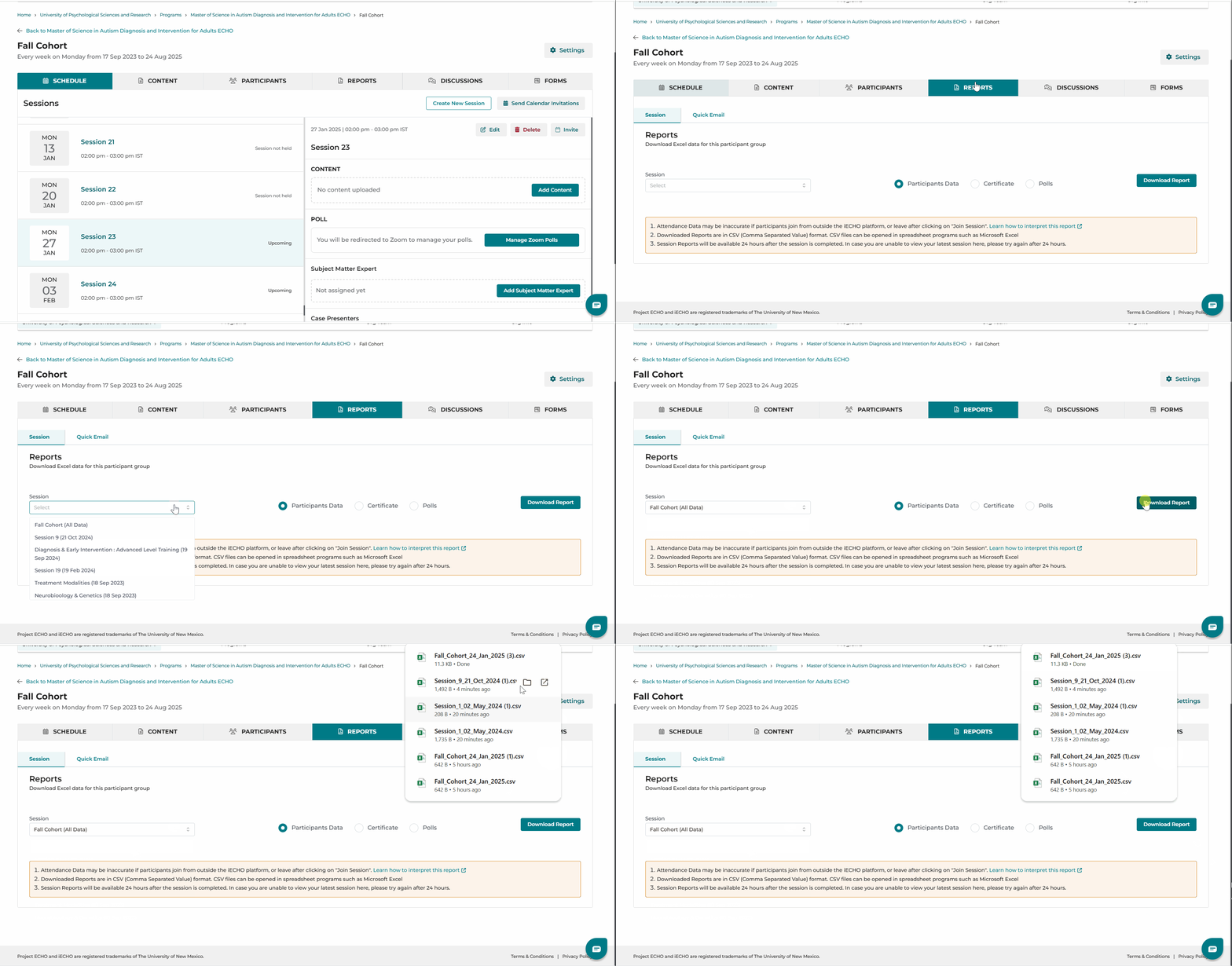
- Select
Participant Data. - Click
Download Report.
We have updated certain reporting terminology for improved clarity:
| Previously Called | New Term | Description |
| Attendance | Participant’s Data | This is an individual session report. (We recommend downloading 24 hours after the session end time, otherwise you may face an error in fetching report in the duration column.) |
| All Sessions (Report) | Participant Group Name* (as used when created) | This is a participant group report for all sessions conducted in the group. (This includes all individuals who joined the sessions from the platform or session reminder email without drop-off.) |
Roles in the report
| Attendee | Participants who are registered on iECHO with an Active status. |
| Invited | Participants who were invited to join a participant group in a program but have not yet registered. |
| Program Admin | Organization team members and ECHO team members registered in the organization. |
| Subject Matter Expert (SME) | An expert who was invited to present on a topic during a session. |
What's new?
Session-level: Attendance Regularization
All metrics for participants in the session export/analytics center update automatically if attendance has been adjusted. Changes appear in the last two columns:
1. Attendance Marked By (second-to-last column) - shows the admin/owner who regularized the session, or Self if the participant marked their own attendance.
2. Regularised (last column) - shows Yes – Reason: [Reason] (e.g. Yes – Reason: Internet Issue) when attendance was regularized. If attendance is not regularized but another user's name appears in "Attendance Marked By," that indicates the participant joined the session using the "Me + Others" option.
If a participant joins using "Me + Others," attendance captures the session duration for the additional participants too. For Organization team and Program Admin, attendance shows as "NA" if they joined a session along with other participants.
Group-level: participant departure & continuity tracking
When a participant leaves a group or is removed by an admin, the group-level export instantly updates to reflect the change:
- Removed by [Admin Name] - if removed by an admin
- Left group - if the participant left voluntarily
The export retains all session participation data for sessions the participant attended before leaving or being removed. If the participant rejoins, the export resumes tracking and displays both past and current session data.
Example: In a group named "Diabetes Management ECHO," Dr. Asha is a participant. If Dr. Kumar (the admin) removes her, the export shows Dr. Asha – Removed by Dr. Kumar. If she leaves on her own, it shows Dr. Asha – Left group. Her previous session details stay visible either way, and if she rejoins, her participation continues to be logged.
Session-level export: field reference
One row of session-level metrics, plus one row per participant in that session.
Session-level metrics
| Field | Description |
|---|---|
| Organization Name | Name of the organization that conducts ECHO Programs. |
| Program Name | Name of the program under which the Participant Group is created. |
| Participant Group | Name of the Participant Group. |
| Session Topic | Topic of the session selected. |
| Participant Group Time zone | Time zone the sessions are conducted in for the group. Default is IST. |
| Start Date & Time | Session start date and exact start time (may vary from scheduled time). |
| End Date & Time | Session end date and exact end time (may vary from scheduled time). |
| Session Status | Only completed session reports can be downloaded. |
| Total Participants (in group) | Total active participants registered for the participant group. |
| Participants Joined | Total unique registered participants who joined the ECHO session. |
| All user (including admins & External SME) | Total unique active members who joined, including Admins and SME. |
| Participant Learning Site | Total unique organizations (learning sites) participants joined from. |
| Participants Joined (including admins) | Total participants including admins, org team, and SMEs. |
| Participants joined outside platform | Unique participants not registered in the group who joined via a shared link (e.g. Zoom link). Counted once even if they leave and rejoin. |
Per-participant fields
| Field | Description |
|---|---|
| First Name / Last Name | Name of the person registered in the Participant group. |
| Status | iECHO activity status — Active (registered on the platform) or Invited (invited but not registered). |
| Academic Qualification | Formal certifications or degrees, if added. |
| Email address of the person. | |
| Country Code | Numerical prefix for international calls, e.g. (+91) for India. |
| Phone Number | Phone number of the person. |
| Roles | Organization Admin or Attendee. |
| Participant Facility/Institute | Place of work or learning. |
| Facility City/Town, District/County, State/Province, Country | Location of the facility/institute. |
| Profession | Occupation requiring specialized training (e.g. Nurse, Physician). |
| City/Town, District/County, State/Province, Country | Where the person resides. |
| Gender | Male or Female, as specified by the person. |
| Primary Speaking Language | Language the platform communicates with the person in. |
| User Time zone | Participant's time zone as entered in their profile. |
| Has certificate | Yes/No - whether the participant has a certificate. |
| Attendance | Session attendance of the participant. |
| Cases Presented | Number of cases presented by the person, if assigned. |
| Attendance Marked By | "Self" if joined via "Only Me"; also "Self" plus others' names if joined via "Me + Others." |
Group-level (all data) export: field reference
Group-level metrics
| Field | Description |
|---|---|
| Organization Name | Name of the organization that conducts ECHO Programs. |
| Program Name | Name of the program under which the Participant Group is created. |
| Participant Group | Name of the Participant Group. |
| Focus Area | Up to five focus areas per program. |
| Has Certificate | Yes/No — whether the program provides a certificate. |
| Participant Group Start Date | Date the Participant Group was created. |
| Participant Group End Date | Typically the last session date under the group. |
| Participant Group Time zone | Time zone the sessions are conducted in. Default is IST. |
| Total Sessions conducted | Total sessions conducted in the group. |
| Total Sessions Cancelled | Total sessions cancelled in the group. |
Per-participant fields
| Field | Description |
|---|---|
| First Name / Last Name | Name of the person registered in the Participant group. |
| Status | Active (registered) or Invited (not yet registered). |
| Academic Qualification | Formal certifications or degrees, if added. |
| Email address of the person. | |
| Country Code / Phone Number | Contact number details. |
| Participant Join Date | Date the participant joined the Participant Group. |
| Roles | Organization Admin or Attendee. |
| Facility/Institute + City/Town, District/County, State/Province, Country | Place of work or learning and its location. |
| Profession | Occupation requiring specialized training (e.g. Nurse, Physician). |
| City/Town, District/County, State/Province, Country | Where the person resides. |
| Gender | Male or Female, as specified by the person. |
| Primary Speaking Language | Language the platform communicates with the person in. |
| Participant Time zone | Time zone as entered in the participant's profile. |
| Has certificate | Yes/No — whether the participant has a certificate. |
| Sessions Attended | Total sessions attended by the participant in this group. |
| Sessions Absent | Total sessions missed by the participant in this group. |
| Cases Presented | Total cases presented by the person in this group, if assigned. |
| Session A / B / C … (with date) | One column per session, named after the session. Binary value: Present or Absent. |
Data accuracy notes
Participants joining from outside the platform
If participants join without using the "Join session" button on their account page or the session reminder email link, iECHO may not accurately capture their attendance - this can lead to data discrepancies in both export types.
- Attendance data may be inaccurate if participants join from outside the iECHO platform, or leave right after clicking "Join Session."
- If a participant is not registered and their user activity status is "Invited," their data will not be generated in the export.
Opening CSV reports
Downloaded reports are in CSV (Comma Separated Value) format and open in spreadsheet programs such as Microsoft Excel. Reports with special-character inputs (e.g. Hindi letters) are best viewed in Google Sheets:
- Open Google Sheets and create a new sheet.
- Click
Fileand selectImportfrom the dropdown menu. - Click
Uploadand select the downloaded CSV file.
Attendance discrepancies
If Zoom attendance and the iECHO report don't match
Differences between what you observed during the Zoom session and the downloaded report are usually explained by one of the following:
- Participants who attempted to join but were dropped off (less than 1 minute after the session started) - this data won't be available in exports.
- ₹Participants who joined from outside the platform. A count of these participants is available in the session-level data export.
🆕 Participants are now counted only once, even if they leave and rejoin a session multiple times.
If neither of these explains the discrepancy, email support@iecho.org or use the chat feature at the bottom right of your screen.